Majic AI / Toolbox / Permit Desk
Case study · Permits · Plan review
Permits and plan review, with every file kept private.
The Permit Desk shows a builder every permit a project needs, checks the plans before they are sent, and gives city reviewers a head start on every residential set. It is built so that sending your plans to the city never means sending them anywhere else.
None
plan sets sent to an outside AI service
Only you
can open your private first-review estimate
Your call
whether your project helps the city learn
Every step
logged, exportable and open to audit
These describe how the Permit Desk is built. It is in demonstration, not yet in use at a city.
The problem
A plan set is a map of someone's home.
Permit drawings show every room, window and door of a house or a business. Cities want help reading them faster, and builders want to know what will come back before they send. AI can do both.
Most AI tools mean sending those drawings to somebody else's servers, and learning from past reviews usually means pooling everyone's files in one place. For a city, that is often where the conversation ends. The Permit Desk was built so it does not have to.
What it enables
Privacy you can point to.
Builders get answers, cities get help, and nobody's file ends up where it should not be.
Plans stay on hardware you own
The desk is built to run on the city's or the company's own servers, with local AI models. Plans, comments and records are never sent to an outside AI service.
Learning without exposure
The desk can tell a builder what usually gets sent back on sets like theirs, from the city's own past reviews. It is built so no answer points back to one project, address or applicant, and it turns away questions aimed at one.
A private look before you send
A builder can get an early read on how a set is likely to do at first review, and which change would make the difference. Only the builder can open it. Reviewers see no record that it was asked.
Consent comes first
A project helps the city learn only when the applicant says yes. Drawings and contact details stay with the submission and are never part of it.
Take it back, and it is gone
An applicant can withdraw their record. What it added is pulled right away, anything that leaned on it is worked out again without it, and the removal can be audited.
A private assistant for each project
The project assistant knows only the signed-in member's own projects and answers in their language. Reviewers see the shared thread with the city, never the assistant chat.
Invitation only, no stored passwords
People join by invitation and sign in with their Majic login. The desk itself keeps no passwords.
Every step on the record
Every machine result and every reviewer action is logged and can be exported. Published answers and removals can be audited.
People decide, and you can pause it
Reviewers make every decision. Any function can be paused, and a published AI fact sheet explains what the AI does.
Who it is for
One desk, three kinds of people.
For builders and homeowners
Pick what you are building and see every permit it needs, which ones need drawings, who may apply and an estimate of the city's fees. Check your plans before you send them, then answer the city's comments one by one.
For cities and plan reviewers
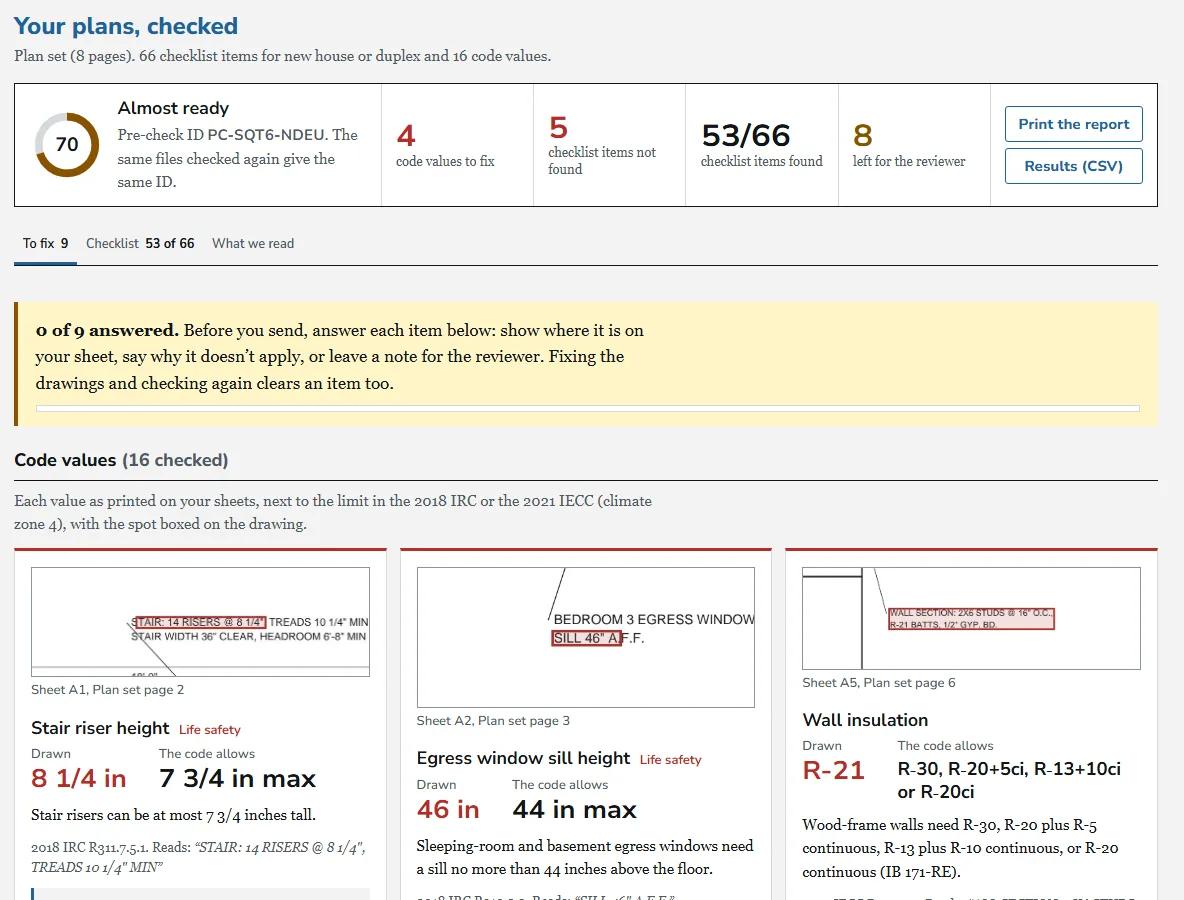
A first pass on every residential set: what is in it, what is missing and which code values are outside the limits, each with the page and the spot on the drawing. Correction letters come drafted. Reviewers decide.
For contractors
Company accounts let the whole team share projects, with roles, one running conversation with the city per project and alerts when something needs you. When you are bidding the work, Majic Bid Board reads the plans and drafts the proposal.
From the first question to the permit
Say you are adding a deck.
What am I building?
Describe the project. The desk lists the permits, the drawings each needs and the fees.
Check the plans
Upload the set. Anything missing or outside the code is boxed on the sheet, with the fix.
Send them in
Send the corrected set. Your whole team can see where it stands.
Answer the comments
The city's corrections arrive as a checklist. Your answers become the response letter.
Permit issued
The city issues the permit. You get the alert, and the crew gets to work.
See it with a project like yours
We will walk you through it.
Bring a project, from the first question to the last correction, and we will show you what the builder sees, what the reviewer sees and what stays private to each.
Probably not a fit if
We would rather say so now.
- You want the AI to approve permits. Reviewers decide, every time.
- You want plans processed on a public AI service. It is built for hardware you own.
- You need commercial plan review today. The first checklists are residential.
The Permit Desk is a Majic AI product, shown in demonstration. It is not affiliated with or endorsed by any city, and permits are issued only by the city.
Want something like this?
Tell us what you are trying to fix.
The people who built the Permit Desk are the people you would work with. A first call costs nothing, and we will tell you plainly whether we are the right fit.